Safeguard Your Privacy Across All Devices
In our digital world, imagine starting your day with a coffee, checking emails on your phone, only to realize hackers could be lurking. Privacy feels like a fragile shield, especially when you’re sharing personal data across smartphones, laptops, and tablets. This story follows Alex, a busy professional, who faced data breaches but learned to protect himself. Every device holds secrets, from family photos to work files, making security essential for everyone. By weaving through Alex’s experiences, we’ll explore simple steps to safeguard your online life and maintain peace of mind.
Protect Mobile Devices
Alex commuted daily, using his smartphone for banking and social media, unaware of public Wi-Fi risks. He installed a VPN to encrypt connections, preventing cybercriminals from stealing data. This step became crucial during his travels. Hackers often target mobile users, so enabling two-factor authentication adds another layer. Moreover, regular software updates fix vulnerabilities quickly. As a result, Alex felt more secure browsing apps on the go. However, he realized sharing locations could expose routines, so he limited app permissions wisely. Therefore, by taking these measures, anyone can shield their phone from threats effectively. In addition, using incognito mode helps avoid tracking cookies during online sessions.

Secure Home Networks
At home, Alex’s family connected multiple devices to the Wi-Fi, creating entry points for intruders. He changed the router password and set up a firewall to block unauthorized access. This action protected smart home gadgets from potential exploits. In fact, enabling guest networks isolates visitors’ devices safely. Additionally, he used strong encryption protocols to enhance overall security. As a consequence, everyday activities like streaming videos became worry-free. However, Alex learned that outdated firmware could invite attacks, so he scheduled regular checks. Furthermore, monitoring connected devices helped identify suspicious activity early. Thus, fortifying your home setup ensures privacy for all users.

Use VPN on Laptops
While working remotely, Alex relied on his laptop for sensitive documents, facing risks from public hotspots. He activated a VPN to mask his IP address and secure data transfers. This tool became indispensable for remote meetings. In addition, it prevented ISPs from tracking browsing history effectively. As a result, Alex maintained confidentiality during client interactions. However, he understood that not all VPNs are equal, so choosing one with a kill switch was vital. Moreover, enabling auto-connect features simplified protection across networks. Therefore, integrating VPNs into laptop routines shields professional and personal data alike. Thus, anyone can adopt this practice for comprehensive defense.
Why NordVPN Stands Out
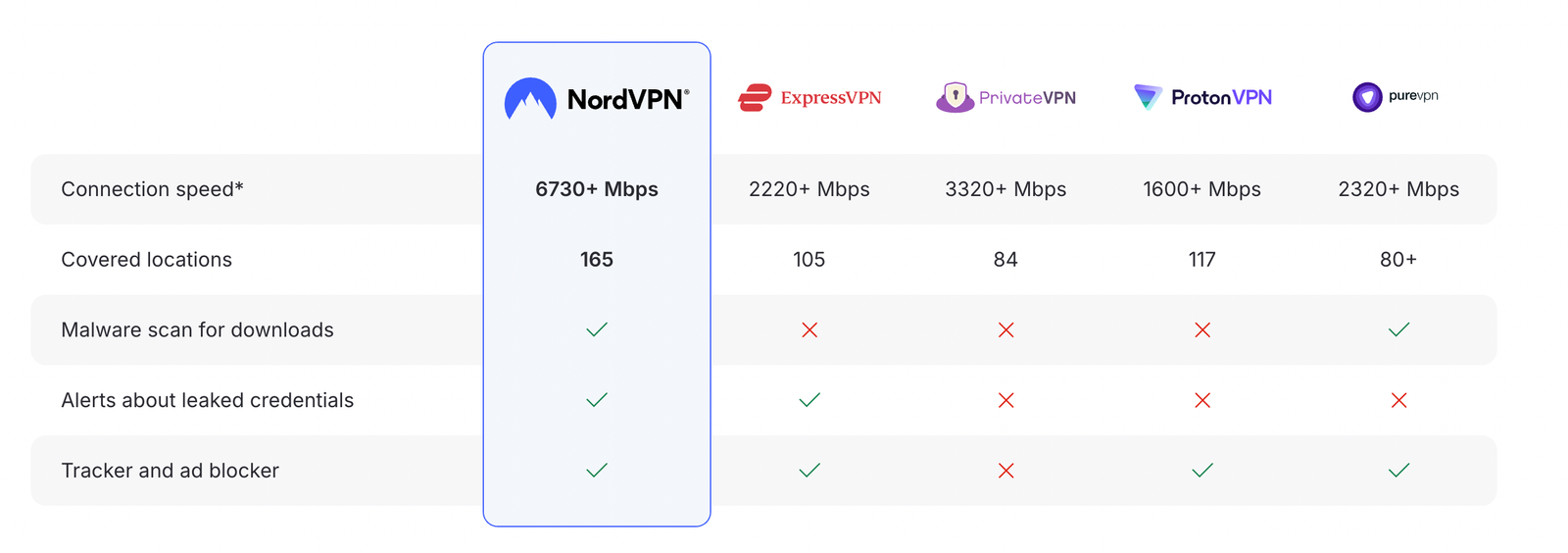
NordVPN emerges as the ideal solution for safeguarding privacy across devices, offering robust encryption and a vast server network. It ensures seamless protection on phones, computers, and tablets with user-friendly apps. Therefore, choose NordVPN for its top-tier security features that block threats effectively. Act now and sign up for NordVPN to secure your digital life today—don’t wait for a breach to act.
How NordVPN compares to other top VPNs
Disclosure: We earn a commission at no extra cost to you if you make a purchase through links here. This helps support us in creating more content for you. Thank you for your support!
Share With Friends